BAM Lead Tracker Updates: June 2026

Dashboard Enhancements for Managers
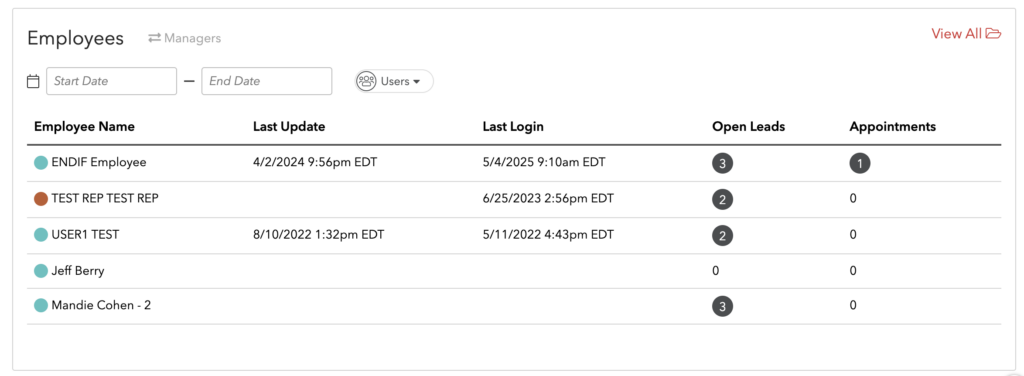
We’ve upgraded the Employee/Manager section on the dashboard with two key improvements:
- Custom Date Ranges – Managers can now select a specific date range to view the total number of assigned leads and appointments for each rep.
- Calendar Color Visibility – Each rep’s associated calendar color now appears directly in the dashboard, making it easier to quickly identify availability when booking appointments.
Why this matters:
Lead catchers and managers can distribute appointments more evenly and efficiently across the sales team.This functionality is active for all BAM Lead Tracker locations.
New Email Nurture Creative Available
We’ve added new email nurture templates to help you better market to your customers, including:
- BLC-centric creative
- General nurture templates for customers with pending appointment statuses
These templates are designed to improve follow-up consistency and increase conversion opportunities.
User-Level Defaults (New Efficiency Feature)
To streamline lead and appointment creation, you can now set user-specific defaults, including:
- Default Lead/Delivery Source
- Default Lead Type
- Default Appointment Type
These dropdown selections will automatically populate when a user creates a new lead or appointment — saving time and reducing manual errors.
How to Set User Defaults (Specific Manager Use Only):
- Go to USERS
- Click the bubble under the Stores column next to the team member
- Select Options
- Click Settings
- Set:
- Default Lead/Delivery Source
- Default Lead Type
- Default Appointment Type
SignNow Update: Automatic Appointment Status Changes
(Applies only to stores with the SignNow integration.)
We’ve added automated appointment status updates based on contract activity:
Part 1:
If an agreement is completed while the appointment status is “Contract Sent” or “Contract Pending”, the system will automatically update the status to: “Transaction”
Part 2:
If an agreement is not signed within a set timeframe, the appointment status will automatically update to: “DNS – Demo No Sale”
- The timeframe (X hours) is customizable by your store.
Why this matters:
This ensures better tracking of sent agreements, improves visibility into unsigned contracts, and helps your team stay on top of follow-ups.
AI Update: Sales Ape Auto-Appointment Scheduling
For stores using Sales Ape, appointments set by the AI agent can now be automatically pushed into the BAM Lead Tracker.
This creates a more seamless, fully automated scheduling experience and reduces manual entry by your team.
Ready to Put These Updates to Work?
These enhancements were built to help you:
- Distribute leads more evenly
- Improve visibility across your sales team
- Automate follow-up and contract tracking
- Increase efficiency and close more business
If you’d like help activating any of these features, updating your nurture campaigns, or configuring your store settings, reach out to our team today.
Referral Program – Give One Month, Get One Month
Love the BAM Lead Tracker? Refer another store that signs up, and you’ll receive one month FREE for every successful referral. There’s no limit — the more you refer, the more you earn.
